
February 23, 2026 · 6 min read
The True Cost of Juggling Freelancer Tools (And How to Fix It)
Most freelancers use 3-5 tools for tasks, time tracking, and invoicing. Here's where the real cost hides — and a framework to decide when to consolidate.

Table of contents
- Where the time and money actually go
- Re-entering data
- Searching for context
- Reconciling discrepancies
- Context switching
- The costs nobody talks about
- A framework: When to consolidate, when to keep separate
- Stay with separate tools if:
- Consider consolidating if:
- What "all-in-one" actually means
- A practical test
- Sources and further reading
It's Friday afternoon. You've just finished a client project. Time to send the invoice.
You open Notion to find the project details. Switch to Toggl to pull the time logs. Copy the hours into a spreadsheet to calculate the total. Open Lexoffice to create the actual invoice. Re-enter the client info, line items, and tax details. Export as PDF. Send via email.
Twenty minutes later, you've sent one invoice. For work that took you a day.
If this sounds familiar, you're not alone. Most freelancers I talk to use between 3 and 5 tools for their core workflow: some combination of a note-taking app, a time tracker, an invoicing tool, and maybe a project board.
Each tool is good at its job. The problem isn't the individual tools. The problem is the space between them.
Where the time and money actually go
The obvious cost is subscription fees. A typical freelancer stack looks something like this:
| Tool | Purpose | Monthly cost |
|---|---|---|
| Notion or similar | Tasks, notes | ~€8 |
| Toggl or Clockify | Time tracking | ~€10 |
| Lexoffice or sevdesk | Invoicing | ~€12 |
| Total | ~€30/month |
€30 a month isn't bad. Most freelancers look at that number and think: "That's fine."
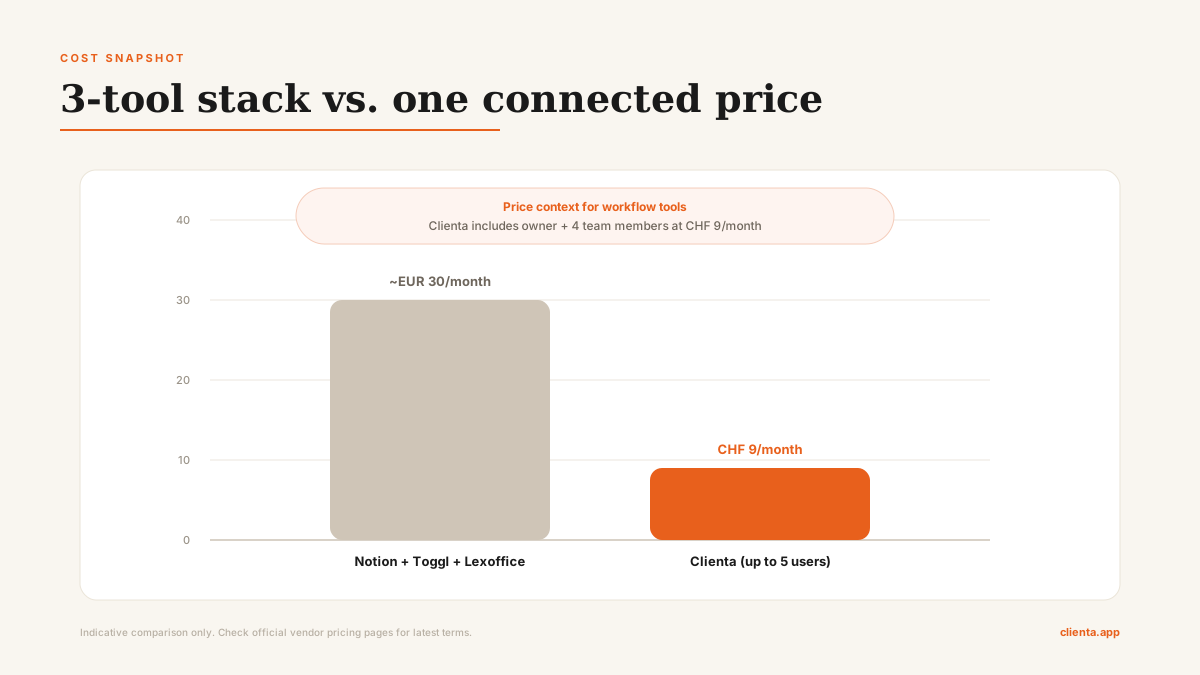
Now compare that with a single connected setup:
| Setup | Monthly price | Team coverage |
|---|---|---|
| 3-tool stack | ~€30/month | Usually priced per user or per tool plan |
| Clienta | CHF 9/month | Up to 5 users (owner + 4 team members) |
Clienta's Professional plan supports up to 15 users (owner + 14 team members).
But the subscription cost is the smallest part. Here's what actually costs:
Re-entering data
Every time you move information from one tool to another — hours from Toggl into Lexoffice, project names from Notion into your invoice — you're doing manual data entry. It takes a few minutes each time. Over a month with 10-15 invoices, that's 2-3 hours of copying numbers between screens.
Searching for context
"What was the hourly rate for this client again?" It's in the contract, which is in Google Drive. Or was it in the Notion project page? Or in the email thread from October? When information lives in 4 different places, finding it takes longer than it should.
Reconciling discrepancies
Your time tracker says 18.5 hours. Your notes say you agreed on 20 hours fixed. The client remembers 15 hours from a call. When each data point lives in a different tool, figuring out the truth requires detective work.
Context switching
This one is harder to measure but real. You're in the flow, working on a client deliverable. You remember you haven't logged yesterday's hours. You switch to Toggl. While there, you notice a timer from last week that's wrong. You fix it. Check email. 15 minutes later, you're trying to remember where you left off.
Researchers from UC Irvine found that after interruptions, people can need over 20 minutes to get fully back on task (source: UC Irvine News). Not every tool switch causes a full reset — but the cumulative effect is significant. If you switch contexts 3 times a day due to tool fragmentation, even losing 10 minutes each time means 30 minutes of unfocused work daily.
The costs nobody talks about
Beyond time, there are costs that don't show up on any invoice:
Errors. Manual data entry between tools introduces mistakes. A wrong number on an invoice looks unprofessional and costs time to fix. A missed time entry means you don't bill for work you did.
Delayed invoicing. When sending an invoice requires 5 steps across 3 tools, you're more likely to put it off. "I'll do invoicing on Friday" turns into "I'll do it Monday." Delayed invoicing means delayed payment. For a freelancer, cash flow matters.
Cognitive overhead. Your brain keeps a background process running: "Did I log those hours? Did I update the project status? Is the invoice template up to date?" That background load is invisible but draining.
A framework: When to consolidate, when to keep separate
Not everyone should switch to an all-in-one tool. Here's how to decide:
Stay with separate tools if:
- Your current workflow is genuinely smooth (honestly — not just "fine")
- You need deep functionality in one area (e.g., advanced accounting features in Lexoffice that no all-in-one matches)
- You have automations connecting your tools that work reliably
- Your team is large enough that different people own different tools
Consider consolidating if:
- You manually copy data between tools more than twice a week
- You've ever sent an invoice with wrong hours because data was in two places
- Your "invoicing day" takes more than 30 minutes for routine invoices
- You're a solo freelancer or small team (1-5 people) and don't need enterprise features
What "all-in-one" actually means
There's a common fear: "All-in-one tools do everything badly."
That's fair for tools that try to be a CRM, a project manager, an accounting suite, and a communication platform at the same time.
But freelancers don't need all of that. The core loop is simple:
- What work do I have? → Tasks and projects
- How much time did I spend? → Time tracking
- How much do I charge? → Invoicing
A tool that does these three things well — and connects them so data flows without manual entry — eliminates the biggest pain points without trying to replace Slack, Gmail, or your CRM.
That's the approach behind Clienta. Tasks, time tracking, and invoicing in one place. Not because one tool is always better, but because for the core freelancer workflow, the connections between features matter more than the individual features.
And there are concrete differentiators beyond "all-in-one":
- Client Approval Workflow: Clients approve billable tasks and hours before invoicing, reducing disputes.
- Encrypted Vault: Keep project passwords and sensitive links in one secure place.
- Swiss QR invoice support: Built-in support for Swiss invoicing workflows.
A practical test
Before you change anything, try this for one week:
- Track how many times you switch tools during your core work (tasks → time → invoice)
- Note how many minutes each switch takes (including the "wait, where was that?" moments)
- Add it up on Friday
If the number is under 30 minutes for the week, your setup is working. Keep it.
If it's over an hour, it might be worth looking at a tool that keeps your core workflow in one place.
Sources and further reading
- Official Toggl Track pricing: toggl.com/pricing
- Official lexoffice pricing: lexoffice.de/preise
- Official MOCO pricing: mocoapp.com/pricing
- Related: Clienta vs MOCO vs Toggl+Lexoffice: 2026 Comparison
- Related: E-invoicing guide for freelancers in Germany (German)
Pricing references above checked on February 23, 2026. Vendor prices can change.
Clienta combines tasks, time tracking, and invoicing for freelancers and small agencies. Pricing starts at CHF 9/month for up to 5 users. Try it free for 6 months
Product updates
Get updates on e-invoicing and new features
Join the list and we'll notify you when new functionality goes live.
Next step
Run your workflow without admin chaos
Join early access and run tasks, time tracking, and invoicing in one connected workflow.